Below you will find a detailed guide how to create a Goolge+ BusinessPage and how to make sure that you get the most out of your business page as a hospitality establishment. Please feel free to contact us should you require assistance with your Google + business page.
Finally, Google is now allowing businesses, brands and any non-human entity to participate in its Google+ social network, through new Google+ Pages.
Quick Guide to create a Google+ Business Page
- Sign in to Google+ (you’ll have to create a Google+ profile if you don’t already have one, go to https://plus.google.com).
- On the right hand side of your stream, click Create a Google+ page.
Select the Local Business or Place category. - Type in your business’s phone number and click Locate. Make sure that the phone number you use is a business line and not a personal or cell phone number.
- If you see your business listed, click on your business’s name. You’ll be able to edit the address later if anything is incorrect. If the name of your business doesn’t appear, click Add your business to Google or Look up a different number to try again.
- Enter or edit basic information about your business, including business name, phone number and address. If Google already has information about your business, you’ll be asked to confirm it. You can also edit any information that’s incorrect.
- Add categories to your local page to help users better understand what your business does. In the Category box, select the main category that best describes your business.
- Select an age restriction that’s appropriate for your business.
Click Create and you’re finished! Now you can visit your page and add even more details about your business, like hours, your website and more contact information.
Google+ Pages Now Welcome Businesses
Now businesses are being welcomed in, through the new Google+ Pages program. Businesses are now able to create Google+ pages for themselves, using the Create A Page tool (and assuming you already have a regular Google+ account — more on this below).
Once you gain access, you’ll be asked to create a page in one of five categories:
- Local Business or Place
- Product or Brand
- Company, Institution or Organization
- Arts, Entertainment or Sports
- Other
Local Is Different
If you’re creating a page for a local business, you have special options including the ability to enter a phone number.
Of course, many local businesses have already claimed their pages in the completely separate Google Places. Much of the information that Google+ Pages for local businesses wants — and more — are on those pages. But they remain unconnected.
Creating A Google+ Page
Here’s a more detailed description at the initial page creation form, which asks for basic information such as a brand name and a URL:

At first, whoever creates the page initially will also be the page administrator. No one else will be able to admin that page after them, at first. Nor can that page be transferred to someone else.
Multiple administrator support is promised in the near future, but until it arrives, it seems important that if your company has a social media manager, that person should be the one to create the account.
Unlike Facebook, there aren’t “vanity” URLs yet available that use a business name rather than a long string of number. The same issue is true of personal accounts. Google provided no update on when this might change.
Don’t like the name of your page? Unlike with Facebook, you can change that at any time. However, if you have verified status, doing this will cause you to lose verification, requiring that process to start again, Google told me.

“Acting” Like A Page
Similar to Facebook, even though you’ll access your page through a personal account, you’ll have the ability to choose whether you want to act as yourself or the business page, when on Google Plus.
You can do many of the same things that a personal account can do, including:
- Share photos
- Share videos
- Share links
- Conduct Hangouts
It doesn’t appear that there’s any support for automatically posting to a page, in the way people can using both native and third-party tools with Twitter and Facebook. That’s likely to come as part of a future Google+ API release. Google gave no further update on when this is coming.
Pages can follow people, but not until they’ve been first followed. That’s nice. It’s not unusual to see business accounts on Twitter follow a bunch of people, just in hopes of getting a reciprocal follow-back. Google+ won’t reward such behavior.
Being Circled As A Business
Google has Google +1 buttons all over the web, but clicking on one of these buttons on a web site doesn’t cause a business to be followed within Google Plus. Instead, as with regular accounts, business pages have to be added to a Google+ circle.
+1 Counts
Having said this, business pages will have something unique compared to regular pages — an overall Google +1 count that shows on their profile page, as you can see in the screenshot below:

That’s from Google’s own business page on Google Plus. It’s supposed to show all the people who have +1′d the entire site, or so it was explained to me when I spoke with Google. Here’s another example, from its briefing screenshots:
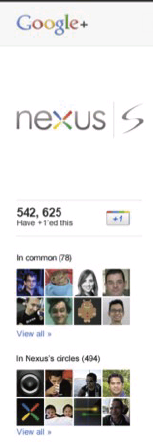
See how there’s a “542,625 Have +1′ed this” section? This is supposed to show all the +1s that a site has earned on all their pages in total. After the regular circle counts are also shown.
However, seeing this live, it appears instead that the +1 count is really just the number of people who have +1′d the particular business page, not all the +1′s on pages within the entire site. Otherwise, the number for Google’s own site should be a lot higher than the 300s.
Badges & Verification
To encourage brands to get followed, Google is launching a new icon to let business pages encourage being followed, with badges — including one similar to Facebook’s “Facepile” badge, promised to be coming soon:

There’s a new badge maker page that’s up, though so far, it’s only offering an icon for using in linking your site to a Google+ page, as explained more below.
Some big or well-known brands will also have Verified Name options, similar to how these work for people.
Direct Connect: Being Found In Search
Another new feature for businesses is the ability to have their pages found through “Direct Connect” in Google Search. This will happen for any business that Google determines is particularly relevant for a search, if it is linked (see below) and if someone searches for the business with a + symbol in front of its name:
If people select the Google+ Page, they’ll be taken directly to that Google+ Page, where they can then follow, if they want.
What If Someone Else Makes “Your” Page?
Anyone can make a business page for any URL without providing proof that they somehow “own” or are associated with that URL. Potentially, that means pages can pretend to be representing a site they’re not connected with.
Verification for big brands (see below) is one way Google aims to combat any problems this might cause. Google also told me that until a Google+ page is connected to a web site (see below), pages also cannot put icons or badges up, nor will they have a chance at being shown in a Direct Connect display.
Linking Pages To Sites
I’d mentioned earlier how a site could be linked to a Google+ page. Linking enables the chance of Direct Connect. It requires:
- Rel=”publisher” link for your site to your Google+ page
- Link from your page back to home page or main page of the site
Google also recommends the use of a the new icon it is offering, which you can find on the badge maker page.
What Hotel Marketers Should Consider When Using Google+ Business Pages.
While it can be exciting to have a new marketing channel and opportunity tap into, it is important that hoteliers consider the following before jumping right in:
1. Choose the account that you set up your Google+ Business page wisely
A Google account activated with a personal Google+ profile is required to set up Business Page. In addition, Google neglected to launch Business pages with the ability to add multiple admins. Google has indicated that adding multiple admin and page transfer capabilities are top priorities for enhancement, but since no timeline has been set this could take weeks or months.
Hoteliers should make sure that the personal Google+ used to set up their page is one that will be managing the page content and will not be taken with the employee if they leave the organization.
2. Posting Frequency
With only 40 million users, people are just starting to learn what Google+ is and how it fits within daily lives. Due to being in its infancy, Google+ newsfeeds have been relatively inactive and light on content compared to Facebook and Twitter.
Although this does increase the possibility of your brand’s followers seeing your messages, since they are not being inundated with posts and messages from users in their circles, it is important to not overwhelm and potentially turn off users by posting too much content.
It is recommended until newsfeeds become more active that brands post less than they do on Facebook and Twitter, and limit to 1 or 2 posts a week.
3. Limited Marketing and Reach
Due to Google+ not allowing advertising on the channel and the lower usage numbers, for consumers to find your page it will be important to add a link to your Website and communications.
Google does have a number of badges that hotels can use, and there are plans to create a plugin similar to the Facebook Like Button that will allow users to automatically be added to your business page by just clicking the button.
Linking will also help activate Google Direct Connect.
4. Optimize Your Page
Optimization is critical for any Social Media profile to fully leverage visibility and organic positioning benefits. When setting up your page, be sure to take the following into account:
- Select the correct category for your business. It is anticipated that Google will be integrating other Google Products like Places into Google+, selecting the right categorization will ensure you are indexed properly.
- Add a link to your Website to help Google connect your Website and business page.
- Be sure to add keyword rich content to the About section of your page.
We hope you found the above tips useful, if you need assistance setting up your Google+ business page, please contact us.